Quinton
Larson


talent scout
•
launched 09.‘25


High level summary

Talent Scout is Indeed’s first AI-native recruiting companion. It reimagines recruiter workflows through prompt-driven, artifact based UX that turns complex data and text into visual and actionable conversational artifacts. What began as a self-initiated experiment evolved into a company defining initiative that reshaped Indeed’s point of view about AI.
Launch product showcasing Job Optimization & Marketplace Anaylisis agents
Exploration Preface
While leading UX for Indeed’s consumer facing Ai product, I became aware our employer product didn't have an AI strategy, nor anyone actively working on one. So, I saw this an exciting opportunity to experiment with Ai in our employer products and explore how it could solve repetitive and time-consuming workflows for our employers (posting jobs, finding and reviewing candidates, analyzing performance, and managing communications).
Since I had a strong understanding of the breadth of core problems plaguing our employers I jumped right into high-fidelity prototyping. I created a tag along AI assistant inside a new recruiter app that helped with daily tasks like organizing next steps/follow ups, surfacing top applicant insights, and providing proactive insights and warnings about job performances. Recruiters could chat with it anytime across the entire product, and in response the Ai could rearrange the existing Ui or take action directly in the chat.
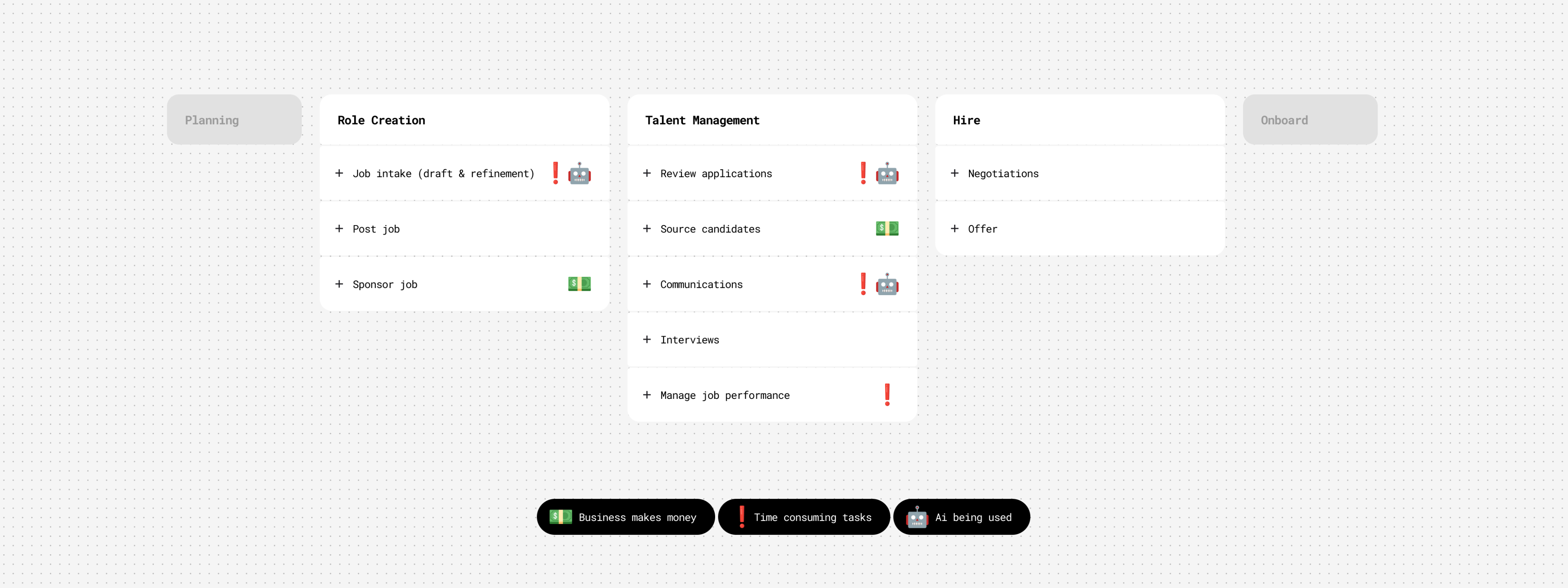
High level hiring flow
Launch product showcasing Job Optimization & Marketplace Anaylisis agents
To refine some of the flows I got feedback from colleagues on the mobile app team, and when it was in a presentable form I shared it with my VP of UX. Around that time our CEO and executive leadership had been brainstorming and discussing how AI could enhance our employer products. So my VP pulled me into an executive workshop to present the prototype to the CEO, EVP of Product and SVP of Engineering. The demo provided immediate and realistic clarity, showcasing how AI integrates with our products, solves core problems, and helps recruiters in a valuable and useful way. The CEO signed off on it and I worked directly with him to further narrow the primary use cases, refine the narrative, and put it in a desktop version. In a Global All Hands, I presented the prototype and our CEO used it as a Northstar to define our employer Ai company strategy, along side announcing a major company shift to put Ai at the core our company.
Mini demo of Global All Hands presentation
Goals & Scope
Quickly after the all hands, the product and engineering leadership partners were added to our small but rapidly growing team. I worked directly with them to set early objectives: build fast, prove user value first, and learn through iterative releases. One of our goals from our CEO was to build the Ai product as a stand alone entity that could be dropped into any partnership products, and we were to treat our own core employer product as such. Next, we worked on prioritizing our highest-impact, and feasible, use cases we felt confident we could launch by our deadline. We debated, investigated, and ultimately focused on three to launch with...
Match & Fit
Help recruiters express intent in natural language and see best-fit candidates via explainable Ai.
Job Optimization & Market Analysis
Benchmark and score job descriptions using live market data to suggest improvements.
Candidates & Communication
Help recruiters efficiently analyze candidates and generate personalized communications.
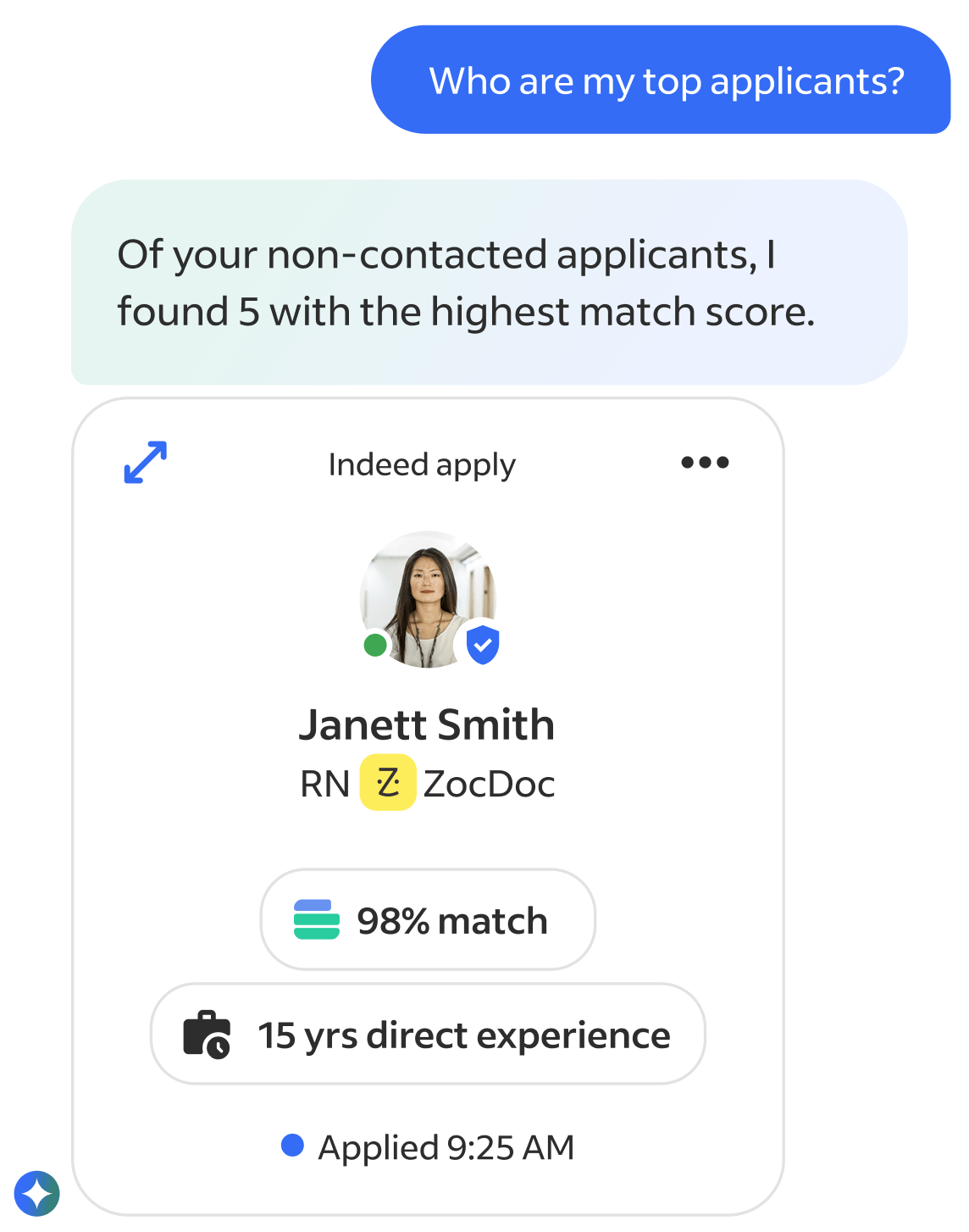
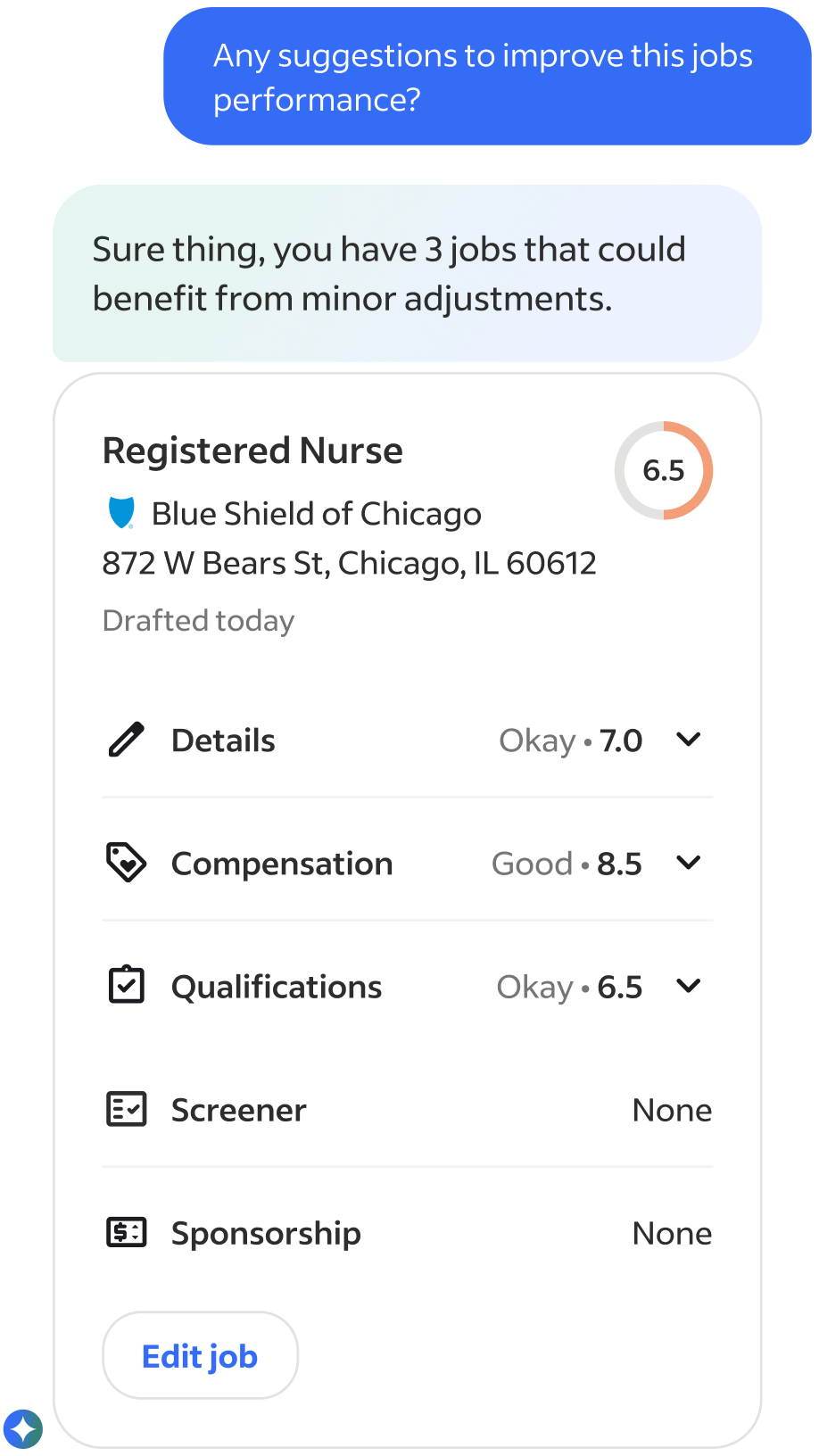
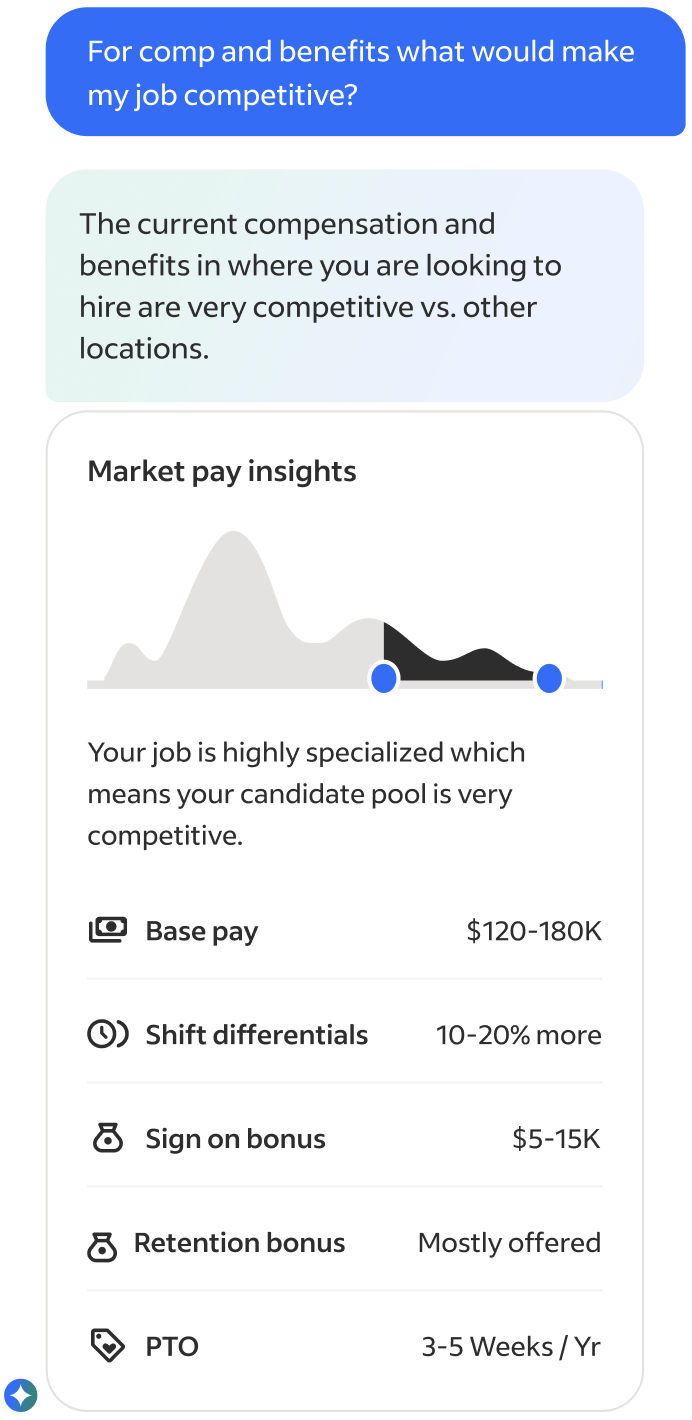
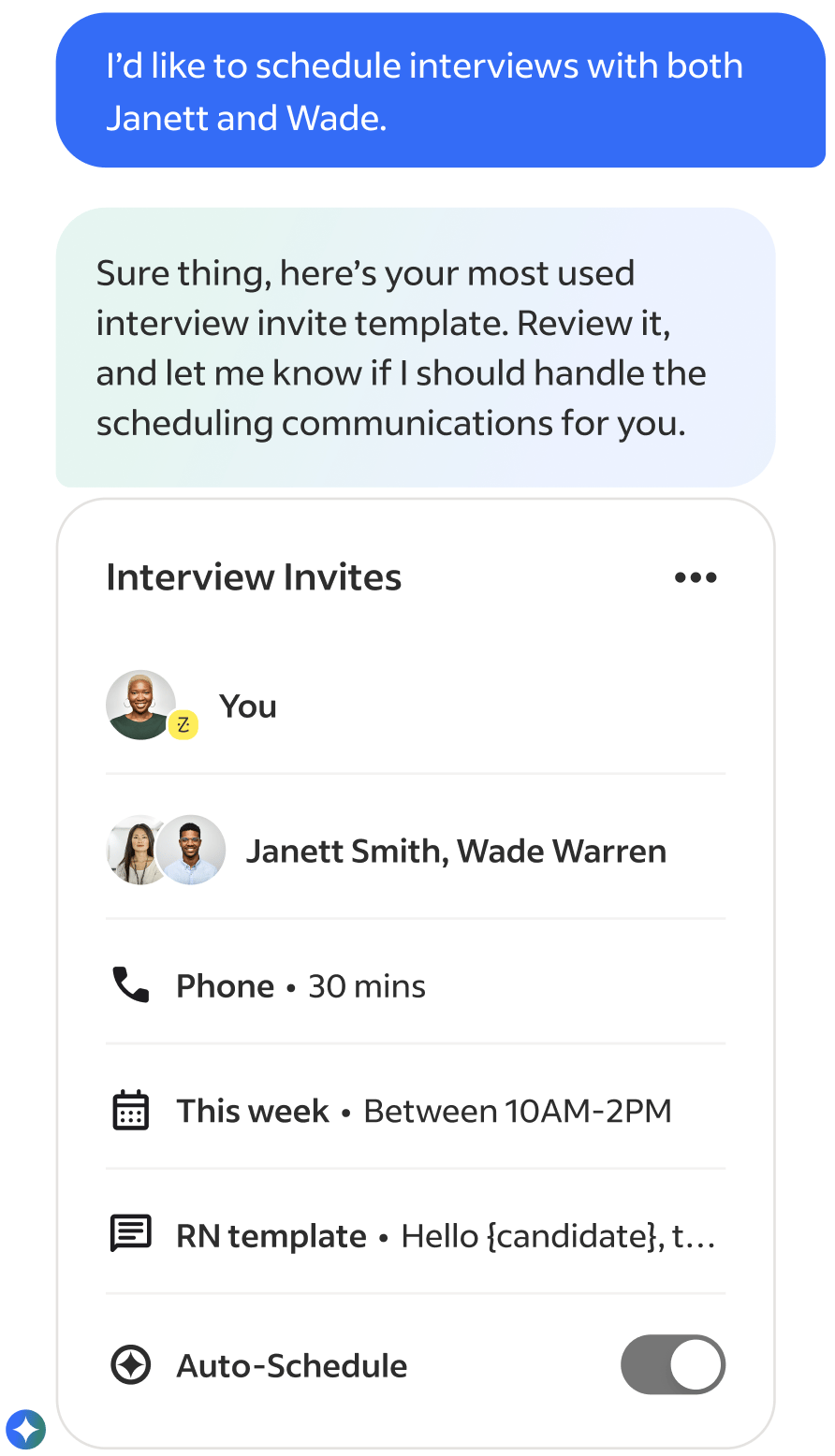
First versions of use case conversation artifacts
We also explored a lot of task assistance use cases, such as automating repetitive work, like supporintg new job intake forms, drafting job posts, fixing broken listings, and embedding in external tool integrations like Slack, Teams, etc... but they ultimately they were deemed too time consuming or not high value enough to the business (later findings provide this wrong ;).
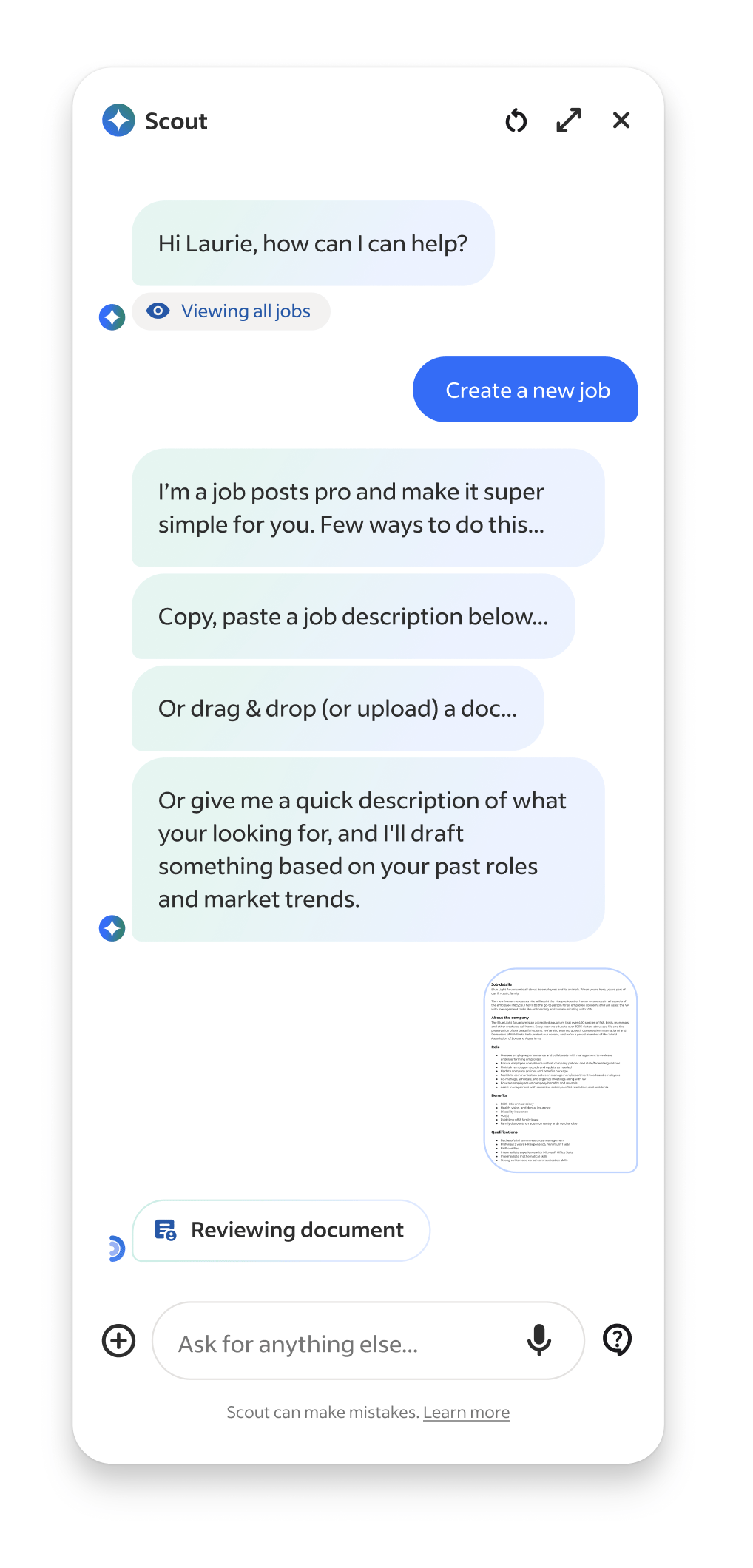
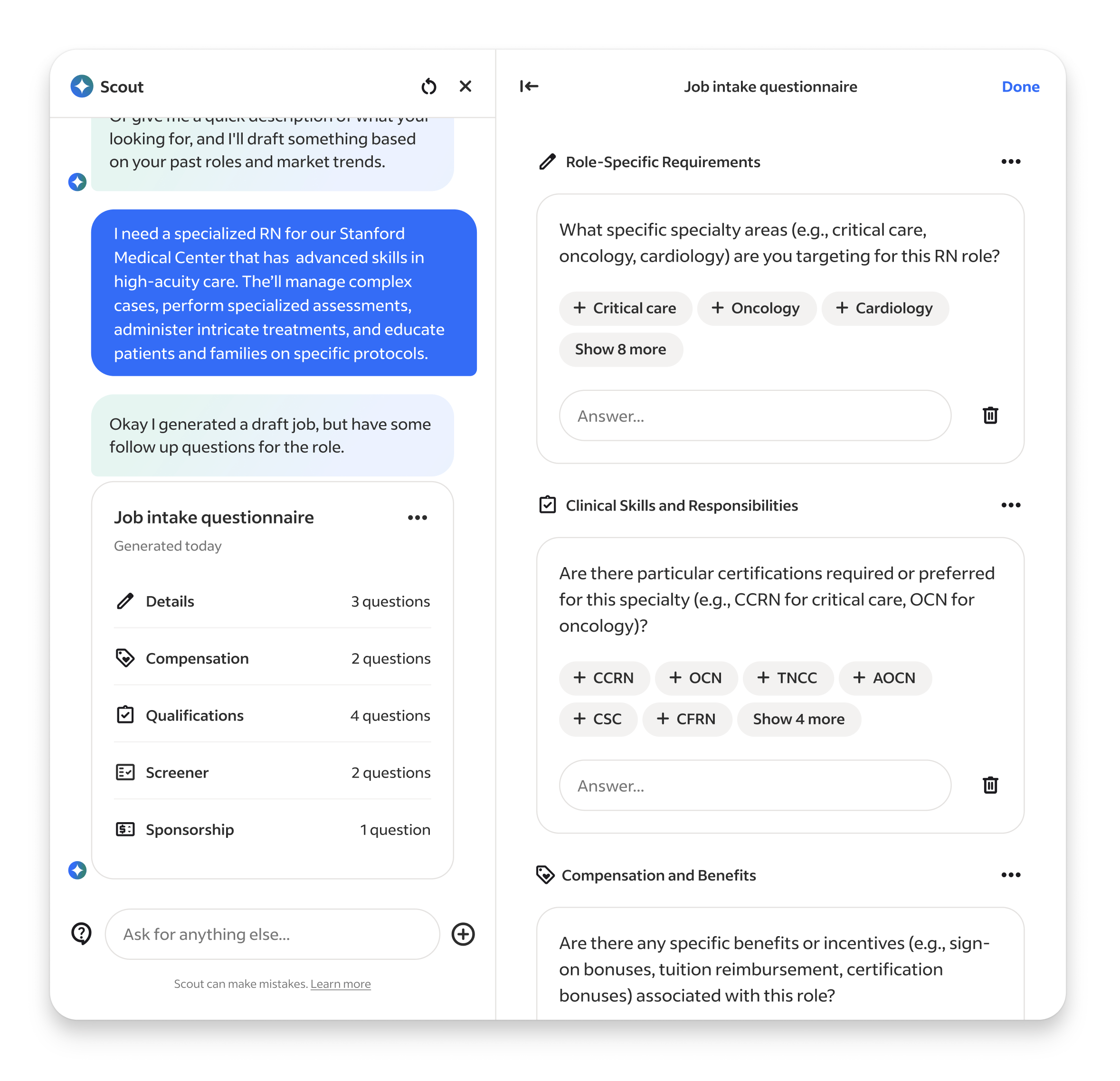
Job Builder & Job Intake agents, showcasing expanded Workpane panel
Setup & Methods
With priorities and a loose roadmap in place we rapidly staffed the teams. For the UX team, it was my first time getting to select my own team so I looked for people who showed signs they could operate like builders, comfortable in ambiguity, quick to build and prototype, and up for the messiness that accompanies 0-1 development in a very unknown space.
Out of the gates it was a hectic. While our product strategy and concepts were based on institutional knowledge informed by years of research and data, in the landscape of emerging Ai they were still all guesses and we had yet to run our first research sessions on the designs. We had SO many unanswered UX questions, so many flows and features to be developed, but we now had a team ready to build... so we went ahead and figured out way through.
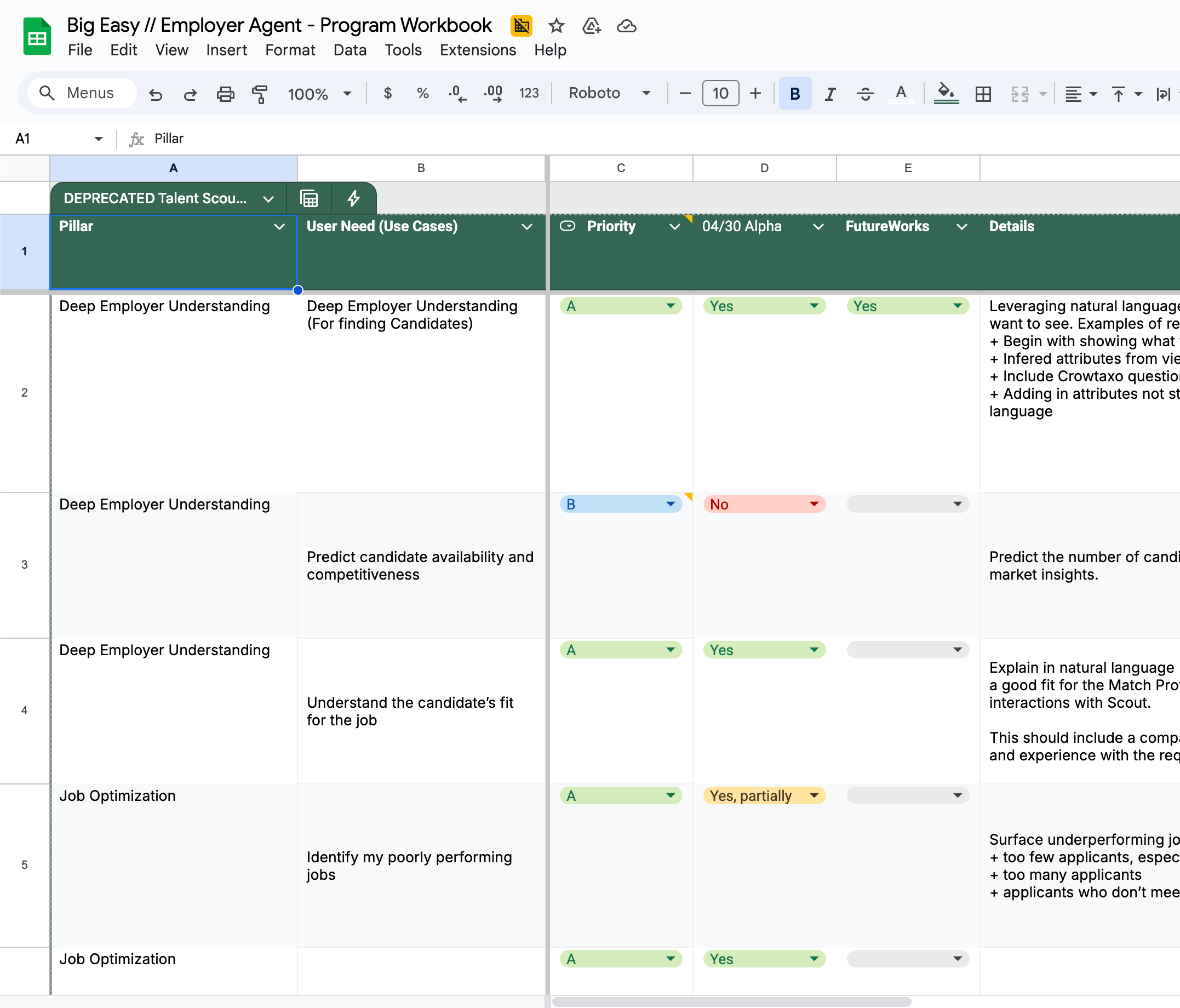

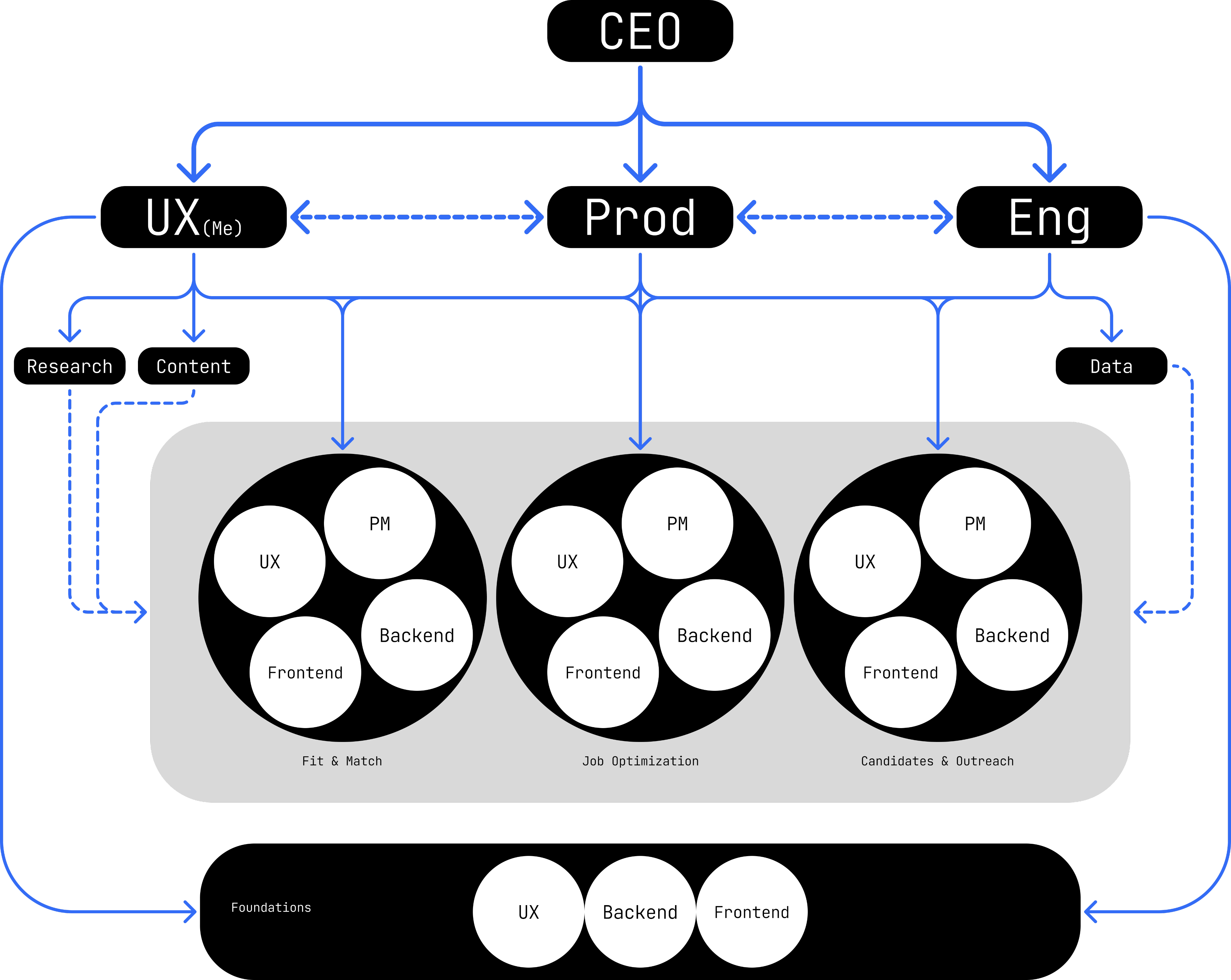
Leadership use case prioritization tool & team structure diagram
At first I kept the UX team focused as a single unit on the entire product. This helped to onboard and orient everyone to what we were building. Once all our teams got some footing and understanding of what we were building, I mirrored the UX team to our product work streams –Match & Fit, Job Optimization, Candidates and Communications, and Foundations. Each owning a distinct slice of the experience.
Collaboration with product and engineering was constant and flexible. We couldn’t rely on heavy documented processes because things were changing daily, so we worked in cycles that emphasized iteration over locked requirements and used constant communication to stay aligned.
Our weekly rhythm created momentum. On Mondays we kicked off planning for the week ahead, reviewing the progress of the previous week, discussing feature evolution, technical complexities, and design refinement driven by the previous and upcoming research. Midweek we built, ran research for rapid feedback and iterated on our designs. Friday we reviewed the week’s build progress, technical discoveries, and design iterations. This cadence helped us balance design rigor with speed, keeping teams synchronized even while exploring multiple new territories.
Caption
Design & Research
For every major work stream I made the first pass of designing the flow and features, then would hand off the work to the designer leading the work stream. My goal was to set the foundation for making Talent Scout feel like it understood intent and, when appropriate, responded to it by delivering pieces of our core product customized to the users prompt. The user should feel like our Ai scoured our products and data for the information needed, organized and personalized it, and then returned a truly customized artifact just for them, that not only answered their request but also provided actionable next steps. Because of technical and scope limitations my experience POV evolved from the earlier Ai interwoven in a product that rearranged existing interfaces, to one that created its own unique ones and delivered it to the user.
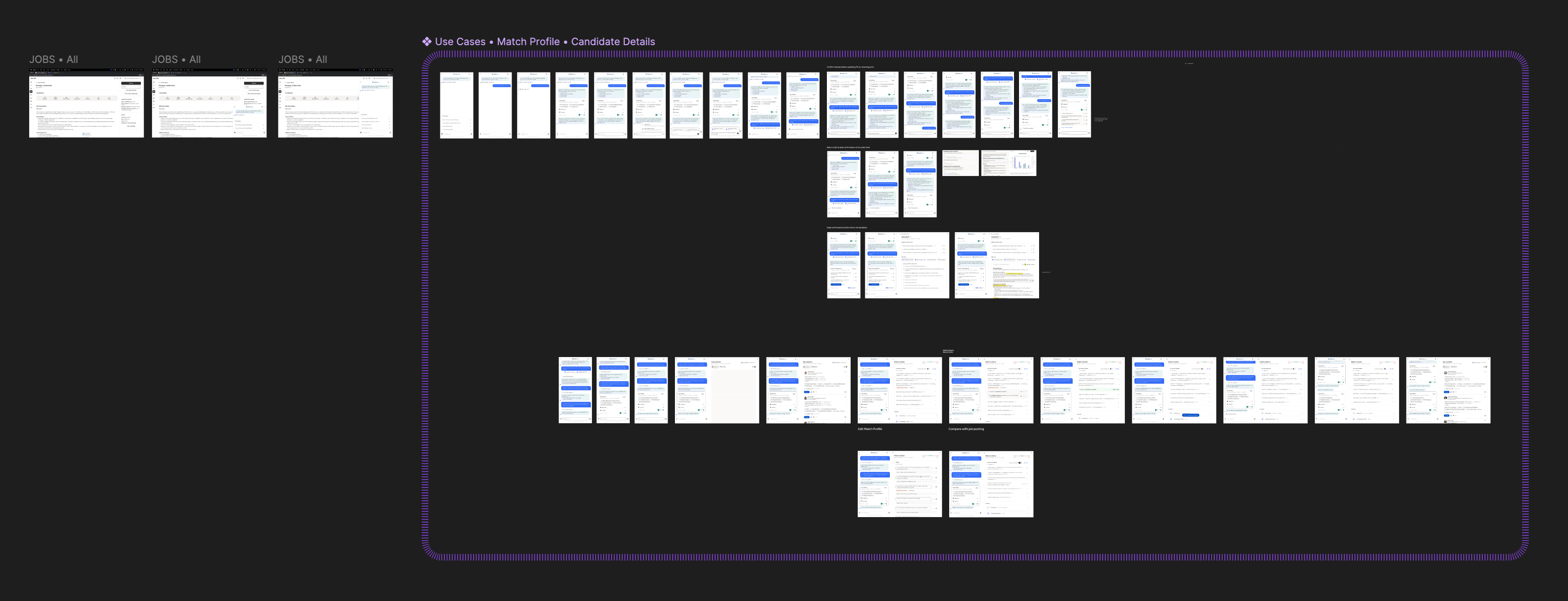
Single work stream use case pass
Through the project design and research were tightly intertwined. Every prototype was both a test and a production reference. Feedback loops happened in real time, sometimes during sessions which allowed us to validate, adjust, and deploy improvements in days rather than weeks. This made design a living process, constantly informed by user behavior and direct feedback. We setup a internal and external testing cadences that allowed us to extract various levels of learnings simultaneously. We used external participants to testing early developing concepts via Fimga prototypes, and internal company recruiters to test internal builds in our QA environment to get feedback on evolving builds. Through our first research we found out that our prodyct had to be FAST> Not only in latency, but in showing the most valuable information Recruiters live in motion moving from call to candidate to close. Our product had to move at their speed, not its own. This was the cornerstone to our experience strategy: deliver less text and more actionable artifacts.
Caption
Limitations & Constraints
Along our exploration and builds we faced unique technical and experience challenges to solve for. One issues we found was a single model or tool had compute limitations and couldn’t interpret recruiter intent, job descriptions, applicant data, and market analysis simultaneously, so we designed multiple specialized sub tools and agents to increase response accuracy.
Another limitation was context understanding and since the AI sat on top of other products, it needed awareness of what was on-screen behind it. We iterated on solutions and ultimately built @mention system inspired by social and employer tools that let users reference jobs or applicants to guide the AI’s focus.
We were hoping to explore threaded conversations around artifacts but those proved extraordinarily difficult to execute, still but remains a future goal.
Caption
Systems & Brand
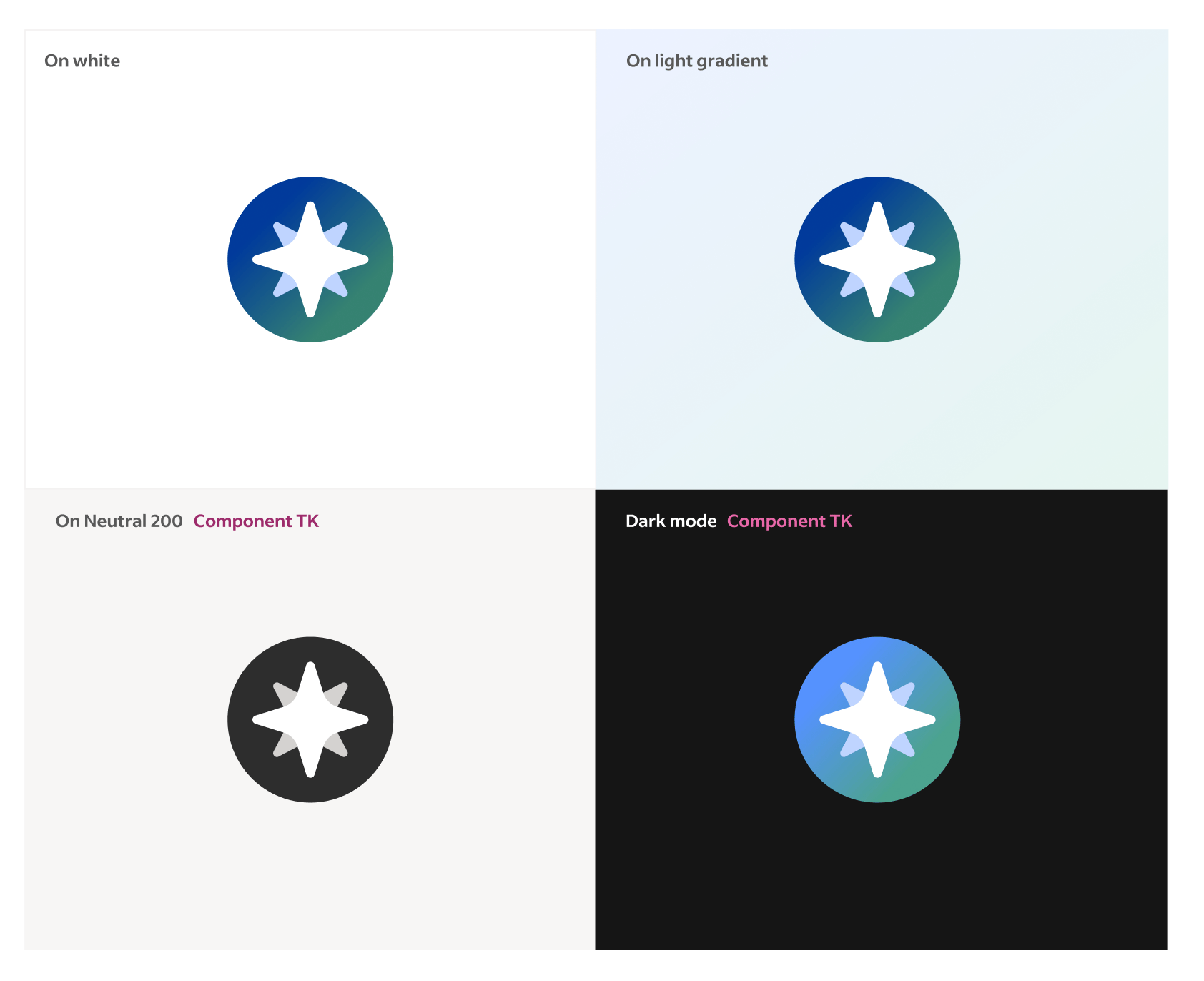
Because our product had to live inside other products and on top of existing Indeed experiences, I collaborated closely with the Design Systems team to ensure consistency while extending beyond existing patterns. We modified the existing foundational elements such as type ramp, icons, and colors to support the constrained space our product existed within. Additionally we built a modular system of cards, charts, and data summaries designed specifically for generated content. This all became the visual foundation for future AI experiences. Lastly partneing with our Marketing and Brand teams we built a sub brand for Talent Scout that fit into our core brand.
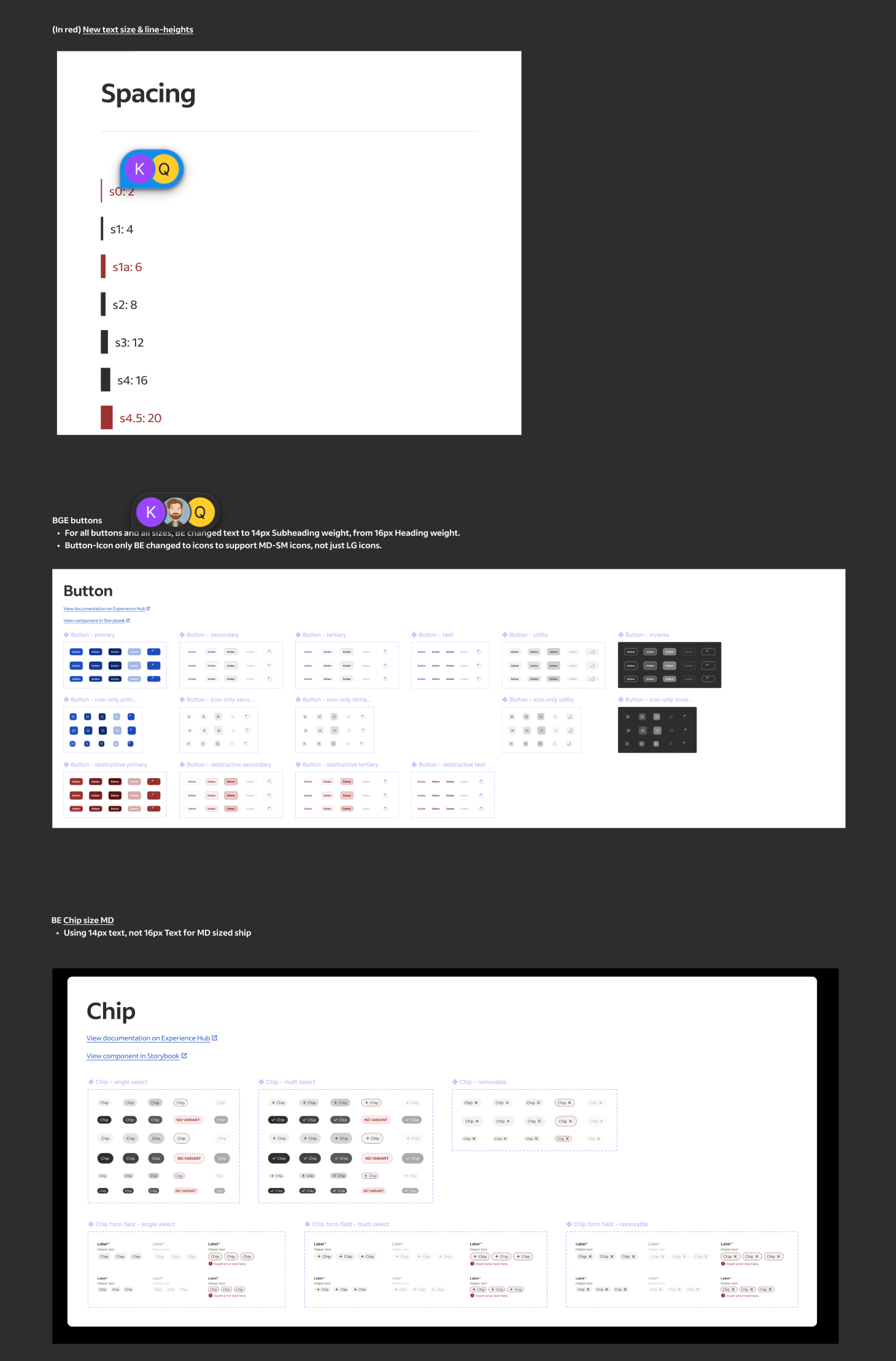
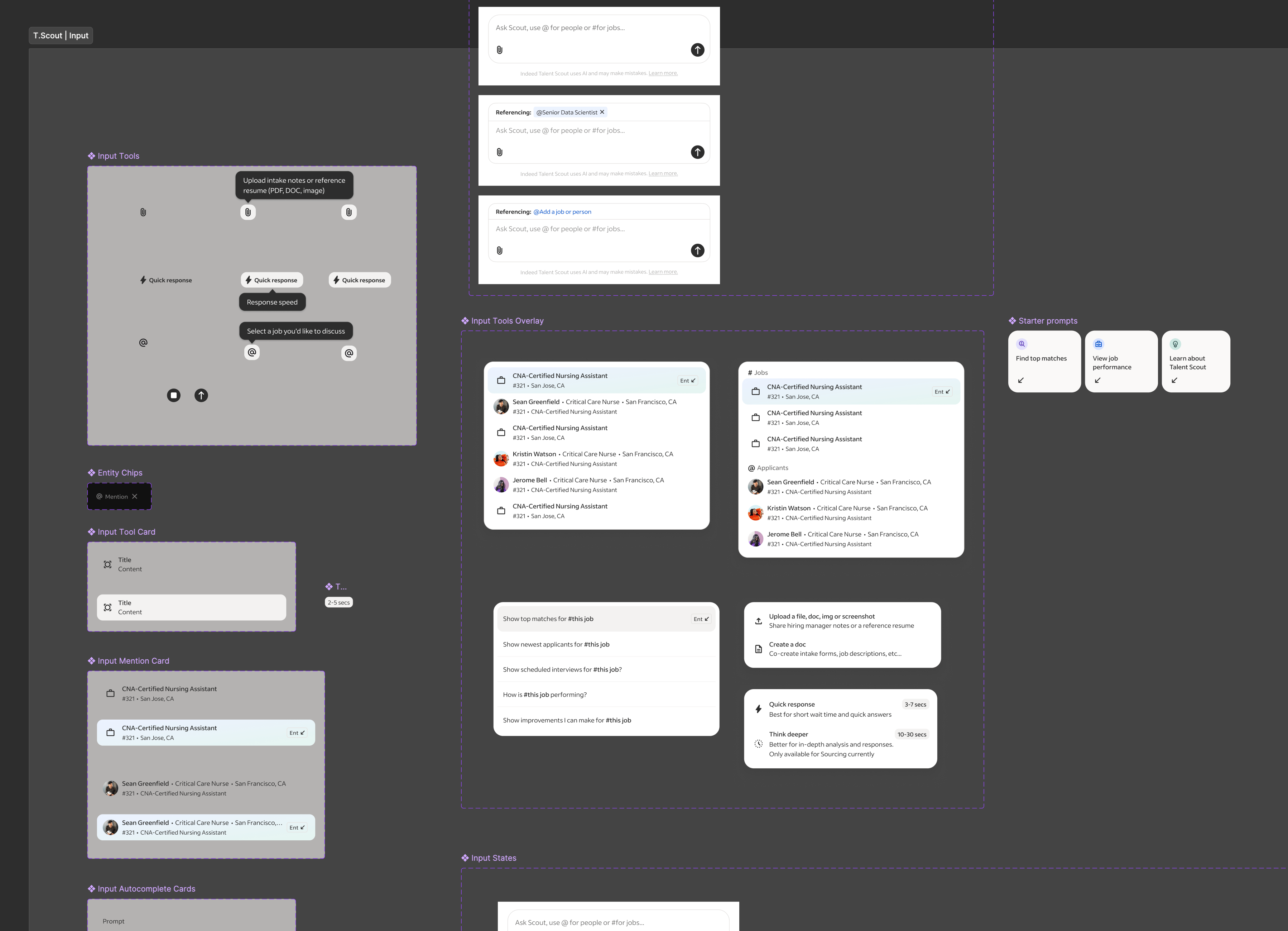
Design system modifcations for Talent Scout •
Beta & Pilots
For our build tests we started with an internal beta, testing weekly with Indeed’s own recruiting teams. Early versions struggled with latency and reliability, but those tests gave us critical insight into realistic usability and expectations. Over time, we refined the product until it could reliably support daily recruiting workflows.
We then moved into a limited external pilot with partner clients inside their Applicant Tracking Systems (ATS). This phase validated how Talent Scout performed in real recruiter environments and taught us how to adapt the AI’s context awareness to different systems. In September, we unveiled Talent Scout publicly at Indeed FutureWorks, launching it to a select set of enterprise clients ahead of a broader rollout.
Caption
Response & Outcomes
Our success metrics combined engagement and performance indicators: activation rates of the floating action button, conversation depth, repeat sessions, and qualitative analysis of user intent fulfillment. Internally, recruiters reported meaningful time savings—reducing time-to-interview from a week to just a few days on some roles.
Feedback highlighted strong appetite for AI support on “grunt-work” tasks—fixing job postings, rewriting descriptions, managing sponsorships and billing. These were the same areas I had initially championed and became priorities for subsequent phases.
Quinton
Larson
talent scout
‘11.24—‘25

talent scout
•
launched 09.‘25
High level summary
Talent Scout is Indeed’s first AI-native recruiting companion. It reimagines recruiter workflows through prompt-driven, artifact based UX that turns complex data and text into visual and actionable conversational artifacts. What began as a self-initiated experiment evolved into a company defining initiative that reshaped Indeed’s point of view about AI.
Launch product showcasing Job Optimization & Marketplace Anaylisis agents
Exploration Preface
While leading UX for Indeed’s consumer facing Ai product, I became aware our employer product didn't have an AI strategy, nor anyone actively working on one. So, I saw this an exciting opportunity to experiment with Ai in our employer products and explore how it could solve repetitive and time-consuming workflows for our employers (posting jobs, finding and reviewing candidates, analyzing performance, and managing communications).
Since I had a strong understanding of the breadth of core problems plaguing our employers I jumped right into high-fidelity prototyping. I created a tag along AI assistant inside a new recruiter app that helped with daily tasks like organizing next steps/follow ups, surfacing top applicant insights, and providing proactive insights and warnings about job performances. Recruiters could chat with it anytime across the entire product, and in response the Ai could rearrange the existing Ui or take action directly in the chat.
High level hiring flow
To refine some of the flows I got feedback from colleagues on the mobile app team, and when it was in a presentable form I shared it with my VP of UX. Around that time our CEO and executive leadership had been brainstorming and discussing how AI could enhance our employer products. So my VP pulled me into an executive workshop to present the prototype to the CEO, EVP of Product and SVP of Engineering. The demo provided immediate and realistic clarity, showcasing how AI integrates with our products, solves core problems, and helps recruiters in a valuable and useful way. The CEO signed off on it and I worked directly with him to further narrow the primary use cases, refine the narrative, and put it in a desktop version. In a Global All Hands, I presented the prototype and our CEO used it as a Northstar to define our employer Ai company strategy, along side announcing a major company shift to put Ai at the core our company.
Launch product showcasing Job Optimization & Marketplace Anaylisis agents
Mini demo of Global All Hands presentation
Goals & Scope
Quickly after the all hands, the product and engineering leadership partners were added to our small but rapidly growing team. I worked directly with them to set early objectives: build fast, prove user value first, and learn through iterative releases. One of our goals from our CEO was to build the Ai product as a stand alone entity that could be dropped into any partnership products, and we were to treat our own core employer product as such. Next, we worked on prioritizing our highest-impact, and feasible, use cases we felt confident we could launch by our deadline. We debated, investigated, and ultimately focused on three to launch with...
Match & Fit
Help recruiters express intent in natural language and see best-fit candidates via explainable Ai.
Job Optimization & Market Analysis
Benchmark and score job descriptions using live market data to suggest improvements.
Candidates & Communication
Help recruiters efficiently analyze candidates and generate personalized communications.
First versions of use case conversation artifacts
We also explored a lot of task assistance use cases, such as automating repetitive work, like supporintg new job intake forms, drafting job posts, fixing broken listings, and embedding in external tool integrations like Slack, Teams, etc... but they ultimately they were deemed too time consuming or not high value enough to the business (later findings provide this wrong ;).
Job Builder & Job Intake agents, showcasing expanded Workpane panel
Setup & Methods
With priorities and a loose roadmap in place we rapidly staffed the teams. For the UX team, it was my first time getting to select my own team so I looked for people who showed signs they could operate like builders, comfortable in ambiguity, quick to build and prototype, and up for the messiness that accompanies 0-1 development in a very unknown space.
Out of the gates it was a hectic. While our product strategy and concepts were based on institutional knowledge informed by years of research and data, in the landscape of emerging Ai they were still all guesses and we had yet to run our first research sessions on the designs. We had SO many unanswered UX questions, so many flows and features to be developed, but we now had a team ready to build... so we went ahead and figured out way through.
Leadership use case prioritization tool & team structure diagram
At first I kept the UX team focused as a single unit on the entire product. This helped to onboard and orient everyone to what we were building. Once all our teams got some footing and understanding of what we were building, I mirrored the UX team to our product work streams –Match & Fit, Job Optimization, Candidates and Communications, and Foundations. Each owning a distinct slice of the experience.
Collaboration with product and engineering was constant and flexible. We couldn’t rely on heavy documented processes because things were changing daily, so we worked in cycles that emphasized iteration over locked requirements and used constant communication to stay aligned.
Our weekly rhythm created momentum. On Mondays we kicked off planning for the week ahead, reviewing the progress of the previous week, discussing feature evolution, technical complexities, and design refinement driven by the previous and upcoming research. Midweek we built, ran research for rapid feedback and iterated on our designs. Friday we reviewed the week’s build progress, technical discoveries, and design iterations. This cadence helped us balance design rigor with speed, keeping teams synchronized even while exploring multiple new territories.
Caption
Design & Research
For every major work stream I made the first pass of designing the flow and features, then would hand off the work to the designer leading the work stream. My goal was to set the foundation for making Talent Scout feel like it understood intent and, when appropriate, responded to it by delivering pieces of our core product customized to the users prompt. The user should feel like our Ai scoured our products and data for the information needed, organized and personalized it, and then returned a truly customized artifact just for them, that not only answered their request but also provided actionable next steps. Because of technical and scope limitations my experience POV evolved from the earlier Ai interwoven in a product that rearranged existing interfaces, to one that created its own unique ones and delivered it to the user.
Single work stream use case pass
Through the project design and research were tightly intertwined. Every prototype was both a test and a production reference. Feedback loops happened in real time, sometimes during sessions which allowed us to validate, adjust, and deploy improvements in days rather than weeks. This made design a living process, constantly informed by user behavior and direct feedback. We setup a internal and external testing cadences that allowed us to extract various levels of learnings simultaneously. We used external participants to testing early developing concepts via Fimga prototypes, and internal company recruiters to test internal builds in our QA environment to get feedback on evolving builds. Through our first research we found out that our prodyct had to be FAST> Not only in latency, but in showing the most valuable information Recruiters live in motion moving from call to candidate to close. Our product had to move at their speed, not its own. This was the cornerstone to our experience strategy: deliver less text and more actionable artifacts.
Caption
Limitations & Constraints
Along our exploration and builds we faced unique technical and experience challenges to solve for. One issues we found was a single model or tool had compute limitations and couldn’t interpret recruiter intent, job descriptions, applicant data, and market analysis simultaneously, so we designed multiple specialized sub tools and agents to increase response accuracy.
Another limitation was context understanding and since the AI sat on top of other products, it needed awareness of what was on-screen behind it. We iterated on solutions and ultimately built @mention system inspired by social and employer tools that let users reference jobs or applicants to guide the AI’s focus.
We were hoping to explore threaded conversations around artifacts but those proved extraordinarily difficult to execute, still but remains a future goal.
Caption
Systems & Brand
Because our product had to live inside other products and on top of existing Indeed experiences, I collaborated closely with the Design Systems team to ensure consistency while extending beyond existing patterns. We modified the existing foundational elements such as type ramp, icons, and colors to support the constrained space our product existed within. Additionally we built a modular system of cards, charts, and data summaries designed specifically for generated content. This all became the visual foundation for future AI experiences. Lastly partneing with our Marketing and Brand teams we built a sub brand for Talent Scout that fit into our core brand.
Design system modifcations for Talent Scout •
Beta & Pilots
For our build tests we started with an internal beta, testing weekly with Indeed’s own recruiting teams. Early versions struggled with latency and reliability, but those tests gave us critical insight into realistic usability and expectations. Over time, we refined the product until it could reliably support daily recruiting workflows.
We then moved into a limited external pilot with partner clients inside their Applicant Tracking Systems (ATS). This phase validated how Talent Scout performed in real recruiter environments and taught us how to adapt the AI’s context awareness to different systems. In September, we unveiled Talent Scout publicly at Indeed FutureWorks, launching it to a select set of enterprise clients ahead of a broader rollout.
Caption
Response & Outcomes
Our success metrics combined engagement and performance indicators: activation rates of the floating action button, conversation depth, repeat sessions, and qualitative analysis of user intent fulfillment. Internally, recruiters reported meaningful time savings—reducing time-to-interview from a week to just a few days on some roles.
Feedback highlighted strong appetite for AI support on “grunt-work” tasks—fixing job postings, rewriting descriptions, managing sponsorships and billing. These were the same areas I had initially championed and became priorities for subsequent phases.
Quinton
Larson
talent scout
‘11.24—‘25
talent scout
•
launched 09.‘25
High level summary
Talent Scout is Indeed’s first AI-native recruiting companion. It reimagines recruiter workflows through prompt-driven, artifact based UX that turns complex data and text into visual and actionable conversational artifacts. What began as a self-initiated experiment evolved into a company defining initiative that reshaped Indeed’s point of view about AI.
Launch product showcasing Job Optimization & Marketplace Analysis agents
Exploration Preface
While leading UX for Indeed’s consumer facing Ai product, I became aware our employer product didn't have an AI strategy, nor anyone actively working on one. So, I saw this an exciting opportunity to experiment with Ai in our employer products and explore how it could solve repetitive and time-consuming workflows for our employers (posting jobs, finding and reviewing candidates, analyzing performance, and managing communications).
Since I had a strong understanding of the breadth of core problems plaguing our employers I jumped right into high-fidelity prototyping. I created a tag along AI assistant inside a new recruiter app that helped with daily tasks like organizing next steps/follow ups, surfacing top applicant insights, and providing proactive insights and warnings about job performances. Recruiters could chat with it anytime across the entire product, and in response the Ai could rearrange the existing Ui or take action directly in the chat.
High level hiring flow
Original prototype presented to executive leadership
To refine some of the flows I got feedback from colleagues on the mobile app team, and when it was in a presentable form I shared it with my VP of UX. Around that time our CEO and executive leadership had been brainstorming and discussing how AI could enhance our employer products. So my VP pulled me into an executive workshop to present the prototype to the CEO, EVP of Product and SVP of Engineering. The demo provided immediate and realistic clarity, showcasing how AI integrates with our products, solves core problems, and helps recruiters in a valuable and useful way. The CEO signed off on it and I worked directly with him to further narrow the primary use cases, refine the narrative, and put it in a desktop version. In a Global All Hands, I presented the prototype and our CEO used it as a Northstar to define our employer Ai company strategy, along side announcing a major company shift to put Ai at the core our company.
Mini demo of Global All Hands presentation
Goals & Scope
Quickly after the all hands, the product and engineering leadership partners were added to our small but rapidly growing team. I worked directly with them to set early objectives: build fast, prove user value first, and learn through iterative releases. One of our goals from our CEO was to build the Ai product as a stand alone entity that could be dropped into any partnership products, and we were to treat our own core employer product as such. Next, we worked on prioritizing our highest-impact, and feasible, use cases we felt confident we could launch by our deadline. We debated, investigated, and ultimately focused on three to launch with...
Match & Fit
Help recruiters express intent in natural language and see best-fit candidates via explainable Ai.
Job Optimization & Market Analysis
Benchmark and score job descriptions using live market data to suggest improvements.
Candidates & Communication
Help recruiters efficiently analyze candidates and generate personalized communications.
First versions of use case conversation artifacts
We also explored a lot of task assistance use cases, such as automating repetitive work, like supporting new job intake forms, drafting job posts, fixing broken listings, and embedding in external tool integrations like Slack, Teams, etc... but they ultimately they were deemed too time consuming or not high value enough to the business (later findings provide this wrong ;).
Job Builder & Job Intake agents, showcasing expanded Workpane panel
Setup & Methods
With priorities and a loose roadmap in place we rapidly staffed the teams. For the UX team, it was my first time getting to select my own team so I looked for people who showed signs they could operate like builders, comfortable in ambiguity, quick to build and prototype, and up for the messiness that accompanies 0-1 development in a very unknown space.
Out of the gates it was a hectic. While our product strategy and concepts were based on institutional knowledge informed by years of research and data, in the landscape of emerging Ai they were still all guesses and we had yet to run our first research sessions on the designs. We had SO many unanswered UX questions, so many flows and features to be developed, but we now had a team ready to build... so we went ahead and figured out way through.
Leadership use case prioritization tool & team structure diagram
At first I kept the UX team focused as a single unit on the entire product. This helped to onboard and orient everyone to what we were building. Once all our teams got some footing and understanding of what we were building, I mirrored the UX team to our product work streams –Match & Fit, Job Optimization, Candidates and Communications, and Foundations. Each owning a distinct slice of the experience.
Collaboration with product and engineering was constant and flexible. We couldn’t rely on heavy documented processes because things were changing daily, so we worked in cycles that emphasized iteration over locked requirements and used constant communication to stay aligned.
Our weekly rhythm created momentum. On Mondays we kicked off planning for the week ahead, reviewing the progress of the previous week, discussing feature evolution, technical complexities, and design refinement driven by the previous and upcoming research. Midweek we built, ran research for rapid feedback and iterated on our designs. Friday we reviewed the week’s build progress, technical discoveries, and design iterations. This cadence helped us balance design rigor with speed, keeping teams synchronized even while exploring multiple new territories.
Caption
Design & Research
For every major work stream I made the first pass of designing the flow and features, then would hand off the work to the designer leading the work stream. My goal was to set the foundation for making Talent Scout feel like it understood intent and, when appropriate, responded to it by delivering pieces of our core product customized to the users prompt. The user should feel like our Ai scoured our products and data for the information needed, organized and personalized it, and then returned a truly customized artifact just for them, that not only answered their request but also provided actionable next steps. Because of technical and scope limitations my experience POV evolved from the earlier Ai interwoven in a product that rearranged existing interfaces, to one that created its own unique ones and delivered it to the user.
Single work stream use case pass
Through the project design and research were tightly intertwined. Every prototype was both a test and a production reference. Feedback loops happened in real time, sometimes during sessions which allowed us to validate, adjust, and deploy improvements in days rather than weeks. This made design a living process, constantly informed by user behavior and direct feedback. We setup a internal and external testing cadences that allowed us to extract various levels of learnings simultaneously. We used external participants to testing early developing concepts via Fimga prototypes, and internal company recruiters to test internal builds in our QA environment to get feedback on evolving builds. Through our first research we found out that our prodyct had to be FAST> Not only in latency, but in showing the most valuable information Recruiters live in motion moving from call to candidate to close. Our product had to move at their speed, not its own. This was the cornerstone to our experience strategy: deliver less text and more actionable artifacts.
Caption
Limitations & Constraints
Along our exploration and builds we faced unique technical and experience challenges to solve for. One issues we found was a single model or tool had compute limitations and couldn’t interpret recruiter intent, job descriptions, applicant data, and market analysis simultaneously, so we designed multiple specialized sub tools and agents to increase response accuracy.
Another limitation was context understanding and since the AI sat on top of other products, it needed awareness of what was on-screen behind it. We iterated on solutions and ultimately built @mention system inspired by social and employer tools that let users reference jobs or applicants to guide the AI’s focus.
We were hoping to explore threaded conversations around artifacts but those proved extraordinarily difficult to execute, still but remains a future goal.
Caption
Systems & Brand
Because our product had to live inside other products and on top of existing Indeed experiences, I collaborated closely with the Design Systems team to ensure consistency while extending beyond existing patterns. We modified the existing foundational elements such as type ramp, icons, and colors to support the constrained space our product existed within. Additionally we built a modular system of cards, charts, and data summaries designed specifically for generated content. This all became the visual foundation for future AI experiences. Lastly partneing with our Marketing and Brand teams we built a sub brand for Talent Scout that fit into our core brand.
Design system modifications • Artifact component library • Branding board
Beta & Pilots
For our build tests we started with an internal beta, testing weekly with Indeed’s own recruiting teams. Early versions struggled with latency and reliability, but those tests gave us critical insight into realistic usability and expectations. Over time, we refined the product until it could reliably support daily recruiting workflows.
We then moved into a limited external pilot with partner clients inside their Applicant Tracking Systems (ATS). This phase validated how Talent Scout performed in real recruiter environments and taught us how to adapt the AI’s context awareness to different systems. In September, we unveiled Talent Scout publicly at Indeed FutureWorks, launching it to a select set of enterprise clients ahead of a broader rollout.
Caption
Response & Outcomes
Our success metrics combined engagement and performance indicators: activation rates of the floating action button, conversation depth, repeat sessions, and qualitative analysis of user intent fulfillment. Internally, recruiters reported meaningful time savings—reducing time-to-interview from a week to just a few days on some roles.
Feedback highlighted strong appetite for AI support on “grunt-work” tasks—fixing job postings, rewriting descriptions, managing sponsorships and billing. These were the same areas I had initially championed and became priorities for subsequent phases.